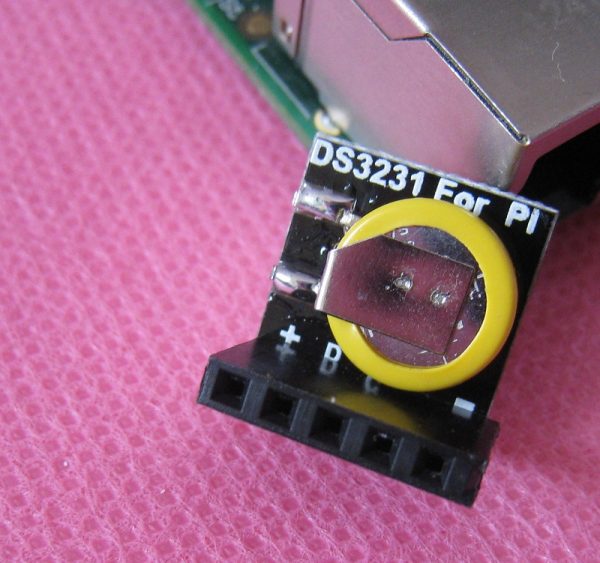
DS3231 RTC 高精度時鐘模組 適用 Raspberry Pi 樹莓派 全系列開發板
- 貨號
- RPIRTC01(A2-13)
- 分類
- Raspberry Pi Part
- 庫存
- 有庫存(0)
商品說明 採用高精度 DS3231 IC 的 RTC 即時時鐘模組,解決 Raspberry Pi或各種嵌入式系統斷電後系統時間重置的問題! DS3231 時鐘模組 特性 -40°C至+85°C溫度範圍內,計時精度保持在±5ppm(±0.432秒/天) 為連續計時提供電池備份 低功耗 完整的時鐘日曆功能包括秒、分、時、星期、日期、月和年計時,並提供有效期到2100 年的閏年補償 兩個日曆鬧鐘 1Hz和32.768kHz輸出 高速(400kHz)I2C串列匯流排 +2.3V至+5.5V電源電壓 精度為±3span>°C的數位溫度感測器 -40°C至+85°C工作溫度範圍 尺寸 : 14×13.5x13mm DS3231 RTC code 按照示意圖裝上 RTC 模組之後,執行下列命令 # Comment out the blacklist entry so the module can be loaded on bootsudo sed -i 's/blacklist i2c-bcm2708/#blacklist i2c-bcm2708/' /etc/modprobe.d/raspi-blacklist.conf # Load the module now sudo modprobe i2c-bcm2708 # Notify Linux of the Dallas RTC device (use -0 for Model A or -1 for Model B) echo ds3231 0x68 | sudo tee /sys/class/i2c-adapter/i2c-1/new_device # Test whether Linux can see our RTC module. sudo hwclock 45 你應該會看到一串回應,也就是 RTC 目前儲存的日期。假如你的系統日期「不」正確,譬如說你沒有連上 Interent。你可以先輸入諸如下列指令直接去校正它,接著再設定 RTC 內部的數值。 # Only do ONE of two the below:sudo dpkg-reconfigure tzdata sudo date -s "Sep 27 2014 12:46:00" # Now that your system date is correct, simply use this command to transfer the system date to the chip: sudo hwclock -w 接下來,想要在每次啟動時都從 RTC 讀取當下的時間,請開啟 /etc/rc.local 並在 exit 0 之前加上這兩行: echo ds3231 0x68 > /sys/class/i2c-adapter/i2c-1/new_device hwclock -s We can also disable the ntp daemon and fake-hwclock during boot. 我們也可以停止在啟動時所啟用的 ntp 與 fake-hwclock sudo update-rc.d ntp disable sudo update-rc.d fake-hwclock disable 透過下列指令從 Internet 校正系統時間。 sudo ntpd -gq sudo hwclock -w